
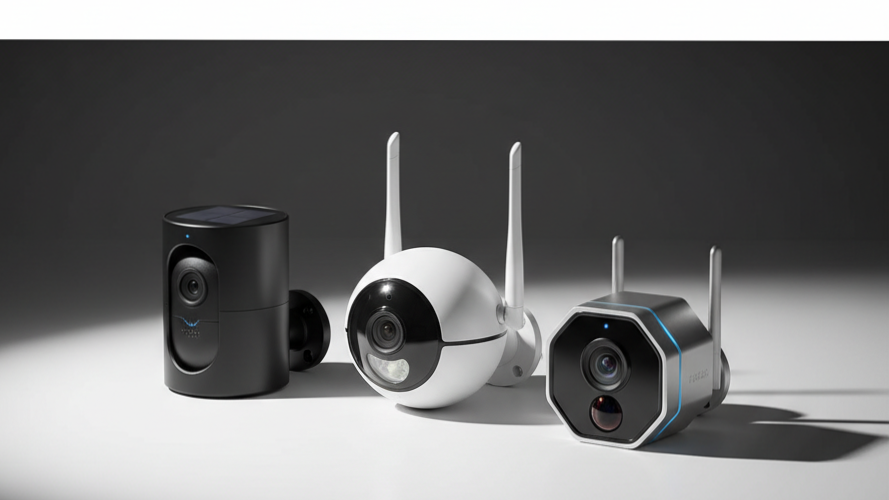
In the current smart home landscape, “subscription fatigue” has transitioned from a minor annoyance into a significant financial drain. Most consumers enter the market looking for a simple way to protect their property, only to find themselves locked into a “security tax.” Major brands often sell hardware at near-cost prices to entice buyers, only to move the goalposts by paywalling essential features like high-definition video playback, person detection, and even the basic ability to record video clips. Over a five-year lifespan, a single camera can cost upwards of $600 in cloud fees—often tripling the initial investment.
Choosing the best outdoor security camera without subscription is more than just a frugal financial move; it is a fundamental shift toward data sovereignty. When you eliminate the cloud intermediary, your sensitive video data no longer lives on a corporate server where it could be subject to data breaches or unauthorized access. Instead, the data stays within your four walls. You are not “renting” your security from a provider; you are owning the infrastructure and the data it produces.
The Subscription Shift: Before and After
Before: The Subscription Trap
- Monthly Fees: Committing to $3 to $10 per month, per camera, creating a perpetual “security tax.”
- Data Hostage: Video history is immediately deleted if a payment fails or the subscription is canceled, leaving you with zero evidence if an incident occurred yesterday.
- Feature Gating: Basic hardware capabilities like 4K resolution or “Rich Notifications” are artificially locked behind paywalls.
- Privacy Risks: Sensitive footage of your home and family is stored on third-party cloud servers, increasing the digital attack surface of your life.
After: The Local Storage Freedom
- One-Time Cost: You pay for the hardware and local storage (microSD or Hub) once. The device serves you for its entire operational life without a bill.
- Data Ownership: Recordings are stored on-site via microSD, a dedicated Hub, or an NVR. You have physical control over the storage medium.
- Full Feature Access: High-resolution 2K/4K playback and AI-powered smart alerts (person/vehicle/pet detection) are processed locally and remain free.
- Privacy Assurance: By utilizing local storage, you significantly reduce the risk of remote hacks, ensuring your private moments stay private.
This evolution is powered by the rise of AI-on-edge processing. Historically, the complex logic required to distinguish a swaying branch from a human intruder required the massive computational power of cloud servers. However, the latest generation of security hardware features dedicated AI chips capable of performing these calculations on the device itself. This reduces latency—meaning you get notifications faster—and eliminates the need for expensive server-side processing. By moving the “brains” of the camera from the cloud to the silicon inside the chassis, manufacturers can now offer sophisticated detection features without needing to charge for ongoing server maintenance.
Master Comparison Table: Top Subscription-Free Outdoor Security Camera Models
Product Name | Resolution | Power Source | Local Storage Type | Key Smart Feature | Price |
TP-Link Tapo C120 | 2K QHD | Wired | microSD Card | Free Person/Pet Detection | Check Price |
Reolink Argus PT Ultra | 4K (8MP) | Battery/Solar | microSD Card | 355° Pan/Tilt & Tracking | Check Price |
Eufy SoloCam S230 | 2K | Integrated Solar | 8GB Built-in | Self-Charging Solar Panel | Check Price |
Lorex 2K Wi-Fi Floodlight | 2K with HDR | Wired | microSD (32GB Incl.) | Customizable LED Lights | Check Price |
Blink Outdoor 2K Plus | 2K | Battery | Sync Module 2 (Hub) | 2-Year Battery Life | Check Price |
Wyze Cam v4 | 2.5K | Wired | microSD Card | Free Object Recognition | Check Price |
TP-Link Tapo C325WB | 2K | Wired | microSD Card | ColorPro Night Vision | Check Price |
Eufy Video Doorbell C31 | 2K | Battery/Wired | microSD/HomeBase | Quick-Release Battery | Check Price |
Comprehensive Buyer’s Guide: What to Consider Before Buying
Transitioning to a no-fee security ecosystem requires a more technical approach to hardware selection. Since you aren’t relying on a cloud provider to bridge the gaps in hardware performance, the technical specifications of your outdoor security camera become paramount.
Resolution and Field of View
Resolution is the foundation of evidentiary value. While 1080p was the standard for years, it often lacks the pixel density required to identify a face or read a license plate at a distance.
- 2K and 2.5K Resolution: These offer a significant “sweet spot,” providing enough detail for identifying subjects up to 20 feet away without overwhelming your local storage.
- 4K (8MP) Resolution: Essential for large properties or driveways. 4K allows for digital zooming into a recorded clip while maintaining usable detail. However, be aware that 4K footage requires high-speed microSD cards (U3 or V30 class) to prevent frame drops.
- Field of View (FOV): A fixed lens typically offers 120 to 140 degrees. If you need to monitor a wider area, look for “Pan-and-Tilt” models like the Reolink Argus PT Ultra, which provides near-360-degree coverage.
Local Storage Architecture
Without a cloud subscription, you must decide where your data will live. There are three primary configurations:
- Onboard microSD Slots: The most common and cost-effective method. The camera stores video on a small card inside the device. While convenient, the footage is vulnerable if the camera is stolen. Ensure the camera supports up to 256GB or 512GB to handle high-resolution files.
- Dedicated Hubs: Systems like the Eufy HomeBase S380 ($150) or the Blink Sync Module 2 store footage on a device located inside your home. This provides a security layer: if a thief smashes the camera, the recording of their face is safe in your living room. The Eufy HomeBase S380 is particularly impressive, supporting up to 16TB of expandable storage via an internal hard drive.
- NVR (Network Video Recorder): Often used by Lorex, these are professional-grade boxes with large hard drives that can record 24/7. This is the only reliable way to achieve continuous recording without a subscription.
AI and Object Detection
To avoid “notification fatigue,” your camera needs to know what it’s looking at. Many budget brands alert you to every swaying leaf, but premium subscription-free brands offer on-device AI for:
- Person and Vehicle Detection: Standard on Tapo, Eufy, and Reolink.
- Pet Detection: Useful for monitoring backyard activity.
- Package Detection: A specialized feature often found in doorbells like the Tapo D130, which specifically monitors the porch floor for deliveries.
Power Management
Your choice of power dictates the camera’s reliability and installation difficulty.
- Wired Plug-in: Offers the best performance, allowing for features like 24/7 continuous recording and faster response times.
- Battery-Powered: Completely wireless and easy to install. However, they typically only record short clips when motion is detected to preserve battery.
- Solar-Powered: A hybrid solution where a small panel (either integrated or detachable) keeps the battery topped off. The Reolink Argus PT Ultra is a standout here for its detachable panel that can be positioned for maximum sun exposure.
Weather Resistance
Outdoor durability is measured by IP (Ingress Protection) ratings.
- IP65: The baseline for outdoor use. It is protected against dust and low-pressure water jets (standard rain).
- IP66: Found on the Tapo C120, this offers superior protection against high-pressure water jets and heavy storms, making it the better choice for exposed locations.
Hidden Costs to Watch For
While you won’t have a monthly bill, “free” security often requires initial accessory investments:
- High-Capacity microSD Cards: These are rarely included. A 256GB card suitable for 4K video typically costs 15–25.
- Storage Hubs: Some systems, like Blink, require a Sync Module 2 ($35) plus a separate USB flash drive to enable local storage.
Hard Drives: If using a Hub like the Eufy HomeBase S380, you may need to purchase a 2.5-inch SATA hard drive to take advantage of the 16TB capacity.
Transitioning to a no-fee security ecosystem requires a more technical approach to hardware selection. Since you aren’t relying on a cloud provider to bridge the gaps in hardware performance, the technical specifications of your outdoor security camera become paramount.
Top 10 Best Outdoor Security Cameras Without Subscription: Deep-Dive Reviews
1. TP-Link Tapo C120 (Best Overall Indoor/Outdoor)
The Overview: The Tapo C120 represents the pinnacle of price-to-performance in the current market. It is a wired, 2K QHD camera that offers a flagship feature set for an entry-level price, often retailing under $30. Its versatile design and magnetic base make it suitable for almost any mounting scenario.
Detailed Specs:
- Resolution: 2K QHD
- Field of View: 120 Degrees
- Power: Wired Plug-in
- Storage: microSD card (up to 512GB)
- Weather Rating: IP66
Pros & Cons: The Tapo C120 is arguably the most versatile camera I’ve tested. Its IP66 rating means it is built to handle heavy storms better than the standard IP65 competitors. The hardware includes an impressively strong magnetic base and a flexible stand, allowing you to mount it on a metal gutter or screw it into a wall with ease. The “AI-on-edge” performance is stellar, providing free, localized detection for people, pets, and vehicles that is both fast and accurate.
From a software perspective, the Tapo app is surprisingly mature for a budget brand. I particularly like the ability to set digital boundary lines that act as specialized motion zones, allowing you to trigger a siren if someone crosses a specific line rather than just moving within the frame. The inclusion of color night vision and compatibility with both Alexa and Google Home ensures it fits seamlessly into most modern smart home ecosystems.
However, the wired nature of the C120 is its primary limitation for outdoor use. You must have a weather-protected outlet nearby, and the USB cable—while long—can be a cable-management headache if you are aiming for a clean, professional look. Unlike battery-powered rivals, you are tethered to the house’s power grid, which limits placement on distant trees or fence posts.
Furthermore, while the camera supports local storage up to 512GB, you have to purchase that card separately, adding roughly $20 to your initial cost. Some users may also find the Tapo app’s interface a bit cluttered, as TP-Link frequently includes small prompts for their “Tapo Care” cloud service, though these are easily ignored and do not hinder the camera’s local-only functionality.
2. Reolink Argus PT Ultra (Best High-Resolution 4K)
The Overview: If your priority is absolute image clarity and total situational awareness, the Reolink Argus PT Ultra is the consultant’s choice. It combines a 4K (8MP) sensor with a motorized pan-tilt base, allowing you to monitor an entire backyard with a single device.
Detailed Specs:
- Resolution: 4K (8MP)
- Field of View: 355° Pan / 140° Tilt
- Power: Battery with Detachable Solar Panel
- Storage: microSD card slot (Up to 256GB)
- Night Vision: Color and Infrared
Pros & Cons: The Argus PT Ultra excels in high-stakes environments where detail is non-negotiable. The 4K resolution provides enough pixel density to digitally zoom into a recorded clip and still read a license plate or identify a facial feature—something 1080p cameras simply cannot do. The included solar panel is a significant value-add; because it is detachable, you can mount the camera in the shade under an eave and place the panel 10 feet away in direct sunlight to keep the battery indefinitely charged.
The pan-tilt functionality isn’t just for show; it features automatic subject tracking. When the camera identifies a person or vehicle, it can physically rotate to follow them across your property, ensuring they never leave the frame. This “active” surveillance is a feature typically reserved for expensive professional systems, yet Reolink provides it here with zero ongoing fees. The object recognition is robust, specifically tuned to filter out false alarms from animals and wind-blown trees.
On the downside, the physical footprint of the Argus PT Ultra is quite large compared to fixed-lens cameras. Its bulky, turret-like design makes it difficult to mount discreetly, and it requires a very sturdy mounting surface to prevent vibration during the motorized panning. Installation is also more complex, as you have to manage both the camera bracket and the separate solar panel mount to ensure optimal sun exposure.
Technically, 4K video is a double-edged sword for local storage. An 8MP video file is significantly larger than a 2K file, meaning a standard 64GB microSD card will fill up very quickly. If you have high traffic in your yard, you will absolutely need a 256GB card to maintain more than a few days of history. Additionally, some users have noted that the Reolink app has a steeper learning curve compared to more consumer-friendly options like Blink or Nest.
3. Eufy SoloCam S230 (Best Solar-Powered Performance)
The Overview: Formerly known as the SoloCam S40, the S230 is the gold standard for “set it and forget it” security. With a high-efficiency solar panel integrated directly into the top of the camera housing, it eliminates the need for charging cables or separate panel mounts.
Detailed Specs:
- Resolution: 2K
- Field of View: 135 Degrees
- Power: Integrated Solar Panel / Internal Battery
- Storage: 8GB Built-in Encrypted Storage
- Spotlight: 600 Lumens
Pros & Cons: The brilliance of the SoloCam S230 lies in its self-contained design. Because the solar panel is built into the chassis, you don’t have to worry about extra wires or finding a second mounting spot for a panel. Just two hours of direct sunlight per day is generally enough to keep the camera powered indefinitely. The on-device encryption and 8GB of internal storage mean that out of the box, this camera requires zero additional purchases to begin recording securely.
Furthermore, the S230 acts as a powerful deterrent. It features a remarkably bright 600-lumen spotlight that can be set to trigger upon motion, effectively turning the camera into a motion-activated floodlight. The AI detection for people is quite accurate, and I appreciate that Eufy keeps the notification latency very low, often hitting your phone within 2 seconds of a detected event.
However, the integrated solar panel means you are restricted in where you can mount the device. If your target area is permanently in the shade (like the north side of a house under deep eaves), the camera will not charge, and you cannot move the panel to a sunnier spot. In these scenarios, the detachable panel of the Reolink Argus PT Ultra is a superior design.
The most significant trade-off is the storage limit. The 8GB of internal memory is non-expandable. While this is enough for approximately two to three months of motion-triggered clips, users who live on busy streets with constant motion may find the camera overwriting old footage sooner than they’d like. You can bridge this gap by connecting the camera to a Eufy HomeBase S380, but that is a $150 accessory that negates the budget appeal of a single-camera setup.
4. Lorex 2K Wi-Fi Floodlight (Best for Large Area Illumination)
The Overview: Lorex is a heavyweight in the professional-DIY space, and this 2K floodlight is designed to replace your existing wired floodlights. It offers massive light output combined with professional-grade local storage features.
Detailed Specs:
- Resolution: 2K with HDR
- Field of View: 122 Degrees
- Power: Hardwired (120V)
- Storage: microSD (32GB card included)
- Siren: 100dB
Pros & Cons: Lorex understands the “local storage purist” better than most. Unlike almost every other brand, they actually include a 32GB microSD card in the box, making this a truly complete package from day one. The floodlights are the star of the show; they are incredibly customizable, allowing you to adjust not only the brightness but also the color temperature (from warm yellow to cool white) to match your home’s exterior lighting.
The video quality is enhanced by HDR (High Dynamic Range), which is crucial for a floodlight camera. Without HDR, when the lights kick on at night, the subject’s face would likely be “blown out” and unidentifiable. Lorex’s sensor handles this transition beautifully, maintaining detail in both the shadows and the bright spots. The free AI detection includes people, vehicles, and even animals, all of which function without any cloud connection.
The primary hurdle is the installation. Because this is a hardwired 120V unit, it is not a “plug-and-play” device. It is meant to replace an existing outdoor light fixture, requiring you to work with electrical wiring. If you aren’t comfortable with basic electrical work, you’ll need to hire an electrician, which adds to the total cost of ownership.
Additionally, while the 32GB card is a nice inclusion, it is relatively small for a 2K camera that monitors a large area. If you use this to monitor a driveway where cars pass frequently, you will likely fill that card in less than a week. We recommend immediately upgrading to a 128GB or 256GB card to ensure you have a reasonable history of recordings to look back on.
5. Blink Outdoor 2K Plus (Best Battery Life/Wireless Simplicity)
The Overview: Blink, an Amazon-owned brand, has carved a niche for itself with extreme battery efficiency. The Outdoor 2K Plus is their latest iteration, offering upgraded resolution while maintaining the “two-year battery” promise.
Detailed Specs:
- Resolution: 2K
- Field of View: 143 Degrees
- Power: 2 AA Lithium Batteries (Included)
- Storage: Local via Sync Module 2 (Requires USB drive)
Pros & Cons: Blink is the best option for users who want zero wires and zero hassle. Using just two AA lithium batteries, the camera can theoretically last up to two years. In my testing, one year to 18 months is more realistic for high-traffic areas, but even that is significantly better than the 3–6 months offered by most rechargeable rivals. The app is one of the most streamlined and easy-to-use in the industry, making it perfect for non-technical users.
To achieve a no-subscription setup, you must use the included Sync Module 2. This small hub sits inside your house and connects to your Wi-Fi. By plugging a standard USB flash drive into the module, the camera will save all its motion clips locally. This setup is highly secure because the recordings are physically inside your home, safe from anyone who might tamper with the camera outside.
However, the “no subscription” experience with Blink is more limited than with Tapo or Eufy. Most notably, Blink does not offer free person detection. Without a subscription, you will receive alerts for all motion. This means a cat running across the yard or a swaying bush will trigger a notification, leading to a higher rate of false alarms.
Additionally, the Sync Module 2 approach has some friction. Accessing locally stored clips through the app is noticeably slower than accessing cloud clips. There is a slight delay as the app retrieves the video from the USB drive in your home. Furthermore, while the camera is 2K, you only get the full resolution and advanced features like “Person Detection” if you pay for the Blink Subscription Plus plan, making this a “subscription-lite” choice rather than a pure “AI-on-edge” solution.
6. Wyze Cam v4 (Best Budget Choice)
The Overview: Wyze built its reputation on $20 cameras, and while the v4 has moved slightly up-market, it remains the ultimate budget king. For under $40, it offers 2.5K resolution and a feature set that rivals cameras triple its price.
Detailed Specs:
- Resolution: 2.5K
- Field of View: 120 Degrees
- Power: Wired
- Storage: microSD card slot (Up to 256GB)
- Night Vision: Color and Infrared
Pros & Cons: The value proposition of the Wyze Cam v4 is undeniable. To get 2.5K resolution, color night vision, and an integrated spotlight for this price point is remarkable. Wyze has also leaned heavily into free on-device AI; the v4 provides free detection for people, vehicles, and pets without requiring their “Cam Plus” subscription. This makes it a very strong competitor to the TP-Link Tapo C120 for the title of best budget camera.
Installation is versatile thanks to the v4’s cube design and magnetic base. It can be tucked into corners or attached to metal surfaces with zero drilling. The app, while busy, offers a lot of granular control, including a “Motion Tagging” feature that places a green box around the moving object in the video, making it very easy to see exactly what triggered the alert at a glance.
However, the v4’s hardware does feel noticeably more “consumer-grade” and “delicate” than the more industrial builds from Lorex or Reolink. It is rated for outdoor use, but the plastic housing feels thin, and I wouldn’t expect it to survive a significant fall or extreme debris during a windstorm as well as an IP66-rated camera would.
Furthermore, Wyze’s app experience is heavily oriented toward upselling their subscription services. You will frequently encounter pop-ups and “locked” icons for features like facial recognition. While the core features you need for local security are free, the constant marketing within the app can be a minor annoyance for those who want a clean, professional “consultant-level” experience.
7. TP-Link Tapo C325WB (Best for Low-Light Color Vision)
The Overview: This is a specialized outdoor camera featuring TP-Link’s “ColorPro” technology. It is designed for those who want to maintain full-color surveillance at night without the use of obtrusive white spotlights.
Detailed Specs:
- Resolution: 2K QHD
- Field of View: 127 Degrees
- Power: Wired
- Storage: microSD (Up to 512GB)
- Sensor: F1.0 Super-Aperture
Pros & Cons: The C325WB is a technical marvel in the low-light category. Most cameras switch to black-and-white infrared mode when the sun goes down, or they turn on a bright white LED to see color. This Tapo model uses a massive F1.0 aperture sensor that can “see” color in near-total darkness using only ambient moonlight or distant streetlights. This is ideal for those who want discreet security that doesn’t advertise its presence with a bright spotlight.
Beyond the night vision, the C325WB is a tank. It features an IP66 weather rating and dual external antennas that provide superior Wi-Fi range. If you are mounting a camera on a detached garage or a far corner of the house where Wi-Fi signal is weak, the C325WB is far more likely to maintain a stable connection than cameras with internal antennas. It also offers the full suite of Tapo’s free AI detection features.
On the downside, the design is decidedly “utilitarian.” With its dual antennas and bulky white chassis, it looks very much like a traditional security camera, which may not appeal to those looking for a modern, sleek aesthetic. It is also a wired-only camera, which means you have to deal with power cables—a common trade-off for cameras with high-performance sensors.
Another consideration is the specific sensor technology. While it excels in low light, in absolute pitch black (like a windowless shed or a rural area with zero ambient light), even this sensor will eventually require some light source. It does have small built-in spotlights for those rare scenarios, but using them negates the “stealth” advantage of the ColorPro technology.
8. Eufy Video Doorbell C31 (Best Entry-Level Doorbell)
The Overview: The C31 is Eufy’s answer to the need for a simple, high-resolution doorbell that respects privacy. It offers 2K clarity and versatile power options without the monthly fee common to Ring or Nest.
Detailed Specs:
- Resolution: 2K
- Power: Battery (Quick-release) or Hardwired
- Storage: microSD or HomeBase S380
- Aspect Ratio: 4:3 (Head-to-Toe)
Pros & Cons: The C31’s greatest strength is its flexibility. You can use the quick-release battery, which makes it easy to pop out and charge without removing the whole doorbell, or you can hardwire it to your existing doorbell chime for 24/7 power. The 2K resolution is crisp, and the 4:3 aspect ratio is specifically designed for doorbells—it allows you to see “head-to-toe,” which is essential for checking if a package has been left on the porch.
Data security is a core focus for Eufy here. You can store your video on a microSD card within the doorbell itself, or link it to a HomeBase S380 hub inside the house for even more storage and security. The response time—the delay between someone pressing the button and your phone ringing—is among the fastest in the subscription-free market.
The trade-off is that the C31 is a “standard” model, meaning it lacks some of the premium AI features found on Eufy’s higher-end doorbells. Most notably, it does not have dedicated package detection. It can tell you if a person is at the door, but it won’t give you a specific alert if a box has been delivered. For that, you would need to step up to the Eufy E340 or Tapo D130.
Additionally, if you hardwire the C31, you will likely need to bypass your home’s original mechanical chime. Eufy includes a digital chime, but this adds another device you have to plug into a wall somewhere in your house. Some users may find the setup of the doorbell, chime, and optional hub to be more hardware-heavy than they anticipated.
9. Aqara Camera Hub G3 (Best for Indoor Smart Home Integration)
The Overview: While mostly an indoor camera, the G3 is a “consultant favorite” because it acts as a bridge for an entire security system. It is a 2K pan-tilt camera that doubles as a Zigbee 3.0 smart home hub.
Detailed Specs:
- Resolution: 2K
- Field of View: 360° Pan
- Power: Wired (USB-C)
- Smart Features: Gesture Recognition, Facial Recognition
- Storage: microSD card slot
Pros & Cons: The Aqara G3 is the “smartest” camera on this list. It features advanced AI that can recognize not just people, but specific faces and even hand gestures. You can program the camera to perform actions when it sees you—for example, if you hold up a “peace sign,” it could turn off the smart lights in the room. It is also one of the few cameras that offers full, native support for Apple HomeKit Secure Video.
Privacy is physically built into the G3. When you turn it off, the camera lens physically rolls up into the housing, and a “sleeping face” appears on the shell. This provides absolute visual confirmation that the camera cannot see you. Because it is a Zigbee hub, you can also connect Aqara’s inexpensive door and window sensors directly to it, creating a full security system without a single monthly fee.
The obvious con is that this is an indoor-only camera. It has zero weather resistance and should never be used outside. If you are building a comprehensive system, the G3 is your “command center” for the interior, but you will still need Tapo or Reolink models for the exterior.
Additionally, to get the most out of the G3, you really need to be invested in the Aqara ecosystem. While it works with Alexa and Google, its best features (like gesture control and sensor triggering) are managed through the Aqara app. It also requires a wired USB-C connection, which limits where you can place it on a shelf or wall.
10. ADT Self-Setup with Nest Cam (Best Professional Hardware)
The Overview: This is a unique hybrid. ADT now allows users to purchase Google Nest hardware (Nest Cam Battery) and self-monitor it through the ADT+ app, providing a path to premium Google hardware without a contract or mandatory monthly fee.
Detailed Specs:
- Resolution: 1080p HDR
- Field of View: 135 Degrees
- Power: Battery or Wired
- Storage: 3-Hour Cloud History (Free)
- AI: Best-in-class Person/Vehicle/Animal Detection
Pros & Cons: This is the only “cloud-first” option I recommend, and here is why: the AI is the best in the business. Google’s detection algorithms are incredibly accurate and fast. Even without a subscription, you get free person, vehicle, and animal alerts. The build quality of the Nest Cam is also superior; it feels like a premium piece of consumer electronics, with a heavy-duty magnetic mount that is the most satisfying in the industry.
One critical detail for “consultants”: while the standard Nest limit is 3 hours of free history, the 3rd-gen wired Nest Cam actually offers 6 hours of free cloud history. This gives you a slightly larger window to check your phone and save a clip if an incident occurs while you are sleeping. If you value the accuracy of the alerts over the length of the storage, this is a very strong contender.
The trade-off is the lack of local storage. There is no microSD slot and no Hub option. You are entirely dependent on the Google cloud. If your internet goes out, the camera will record up to an hour of footage to its internal memory, but you can only see it once the internet returns.
The 3-hour (or 6-hour) window is also a significant limitation. If someone vandalizes your car at 2:00 AM and you don’t check your phone until 8:00 AM, the footage is gone forever. This camera is only for those who are “active monitors”—people who check their notifications immediately. If you want a history you can look back on days later, you must choose one of the local storage options like Reolink or Lorex.
Best Choices for Different User Needs
The Ultimate Budget Setup
For a comprehensive home system under $150, I recommend a mix of Wyze and TP-Link Tapo. Use a Tapo C120 for your main entryway to take advantage of its IP66 rating and free person detection, and use Wyze Cam v4s for secondary areas. This setup gives you 2K+ resolution and localized AI alerts with zero monthly fees.
The High-End Performance Rig
If you want professional-grade evidence, focus on Reolink and Eufy 4K. A system consisting of the Reolink Argus PT Ultra for backyard coverage and a Eufy SoloCam S340 (or S230) for the front yard provides the best possible image quality. Pair these with a Eufy HomeBase S380 ($150) and a 2TB hard drive to secure up to 16TB of data locally.
The Hands-Off Solar Solution
For high-up locations where climbing a ladder is a chore, the Eufy SoloCam S230 with its integrated panel is the simplest choice. For areas with less direct sun, the Reolink Argus PT Ultra with its detachable/positionable panel is the superior technical solution, as it allows you to hunt for sunlight while keeping the camera in the shade.
The Local Storage Purist
If you do not trust the cloud at all and want 24/7 recording, Lorex is the only logical choice. Their hardwired floodlight and NVR systems are designed to operate entirely offline if necessary, storing every second of footage on physical hard drives that you own and control.
Final Verdict and Recommendation
The era of the mandatory monthly security “tax” is over. As this guide demonstrates, the shift toward on-device AI and robust local storage means that homeowners no longer have to sacrifice high-end features to save money. You can have 4K resolution, person detection, and 360-degree coverage without ever writing a check to a cloud provider.
Author’s Recommendation
- Best Overall: The TP-Link Tapo C120. Its IP66 rating, 2K clarity, and magnetic mounting make it the most versatile and reliable budget-friendly option on the market.
- Best Premium Setup: The Reolink Argus PT Ultra paired with a Eufy HomeBase S380 (for those who want to mix and match) or a full Eufy 4K system. The detail provided by 4K is simply unmatched for identifying intruders.
Stop paying for the privilege of viewing your own property. When you buy outdoor security camera without subscription, you are investing in a tool that protects your home today and saves you hundreds of dollars over the coming years. Take control of your data and your wallet today.
Detailed FAQ
What features are usually locked behind subscriptions?
Typically, brands like Ring and Arlo lock all video recording and cloud history behind a subscription. In the cameras on this list, only advanced features like facial recognition, long-term cloud backup (30+ days), and “rich” notifications (thumbnails in the alert) are paywalled. Core motion recording and person detection remain free.
How much do microSD cards actually cost?
They are very affordable. For these cameras, I recommend “High Endurance” cards. A 128GB card (enough for weeks of clips) costs about $15, while a 256GB card is typically under $25. Ensure you buy Class 10, U3, or V30 cards for 4K video.
Is there such a thing as free cloud storage?
Yes, but it’s limited. The ADT/Nest system offers a 3-hour window for free. Most other brands (Tapo, Eufy, Reolink) provide 0 hours of free cloud but allow for unlimited local storage via microSD.
How fast does local storage fill up?
A 32GB card (like the one included with Lorex) can store a few days of motion clips at 2K. A 128GB card typically holds 2–4 weeks of motion events. If you are recording 24/7 (continuous), a 128GB card will fill up in about 48–72 hours depending on the resolution.
What is the difference between a Hub, a microSD, and an NVR?
- microSD: A card inside the camera. Simple but vulnerable to theft.
- Hub: A device inside your home (e.g., Eufy HomeBase S380). More secure and offers more storage.
- NVR: A professional box for 24/7 recording of multiple cameras.
Can I still access my camera remotely without a subscription?
Yes. As long as the camera has a Wi-Fi connection, you can view the live feed and access your locally stored clips via the app from anywhere in the world for free.
Do these cameras have person/package detection for free?
Tapo, Eufy, Reolink, Wyze, and Lorex all offer person detection for free. Package detection is more specialized; the Tapo D130 is specifically cited for having this as a free on-device feature.
What is the recommended IP rating for outdoor use? Look for IP65 as a minimum for rain resistance. If the camera will be in an exposed area subject to high-pressure storms or extreme weather, the IP66 rating found on the Tapo C120 is highly recommended.